VRC ルームシステム (VRC Room System)
- ダウンロード商品¥ 4,800
🇯🇵 ルームシステム これは、ワールドに機能的な部屋を追加するVRChatワールドアセットです。 このシステムは完全にモジュール化されており、必要な数だけ部屋を追加できます。設定は単一の親GameObjectで一括管理され、作成したすべての部屋に自動的に反映されます。 ----------------------------------------------- 🇬🇧 Room System This is a VRChat world asset that adds functional rooms to your worlds. The system is fully modular, allowing you to add as many rooms as needed. Configuration is managed through a single parent GameObject, which automatically applies your settings to all created rooms.
機能 (Features)
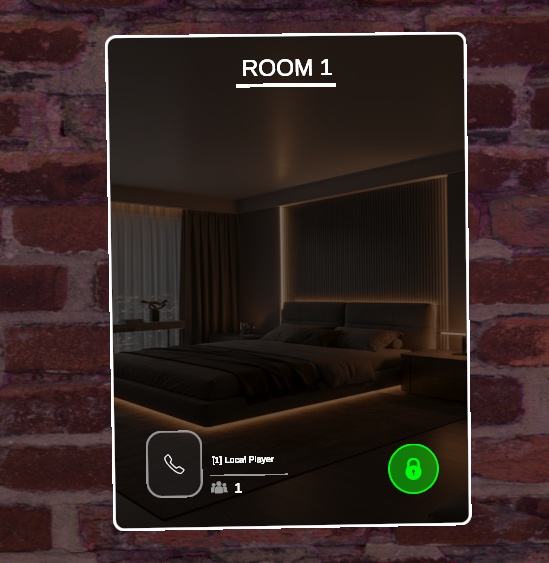
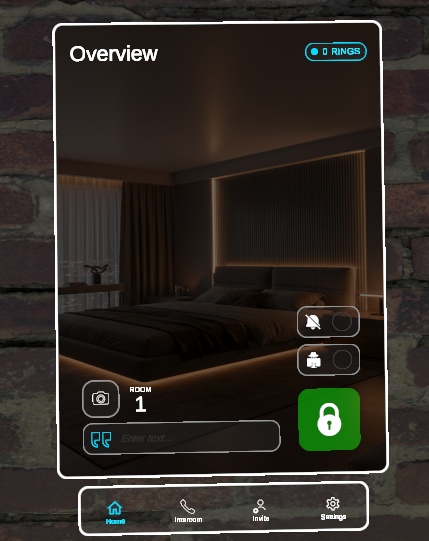
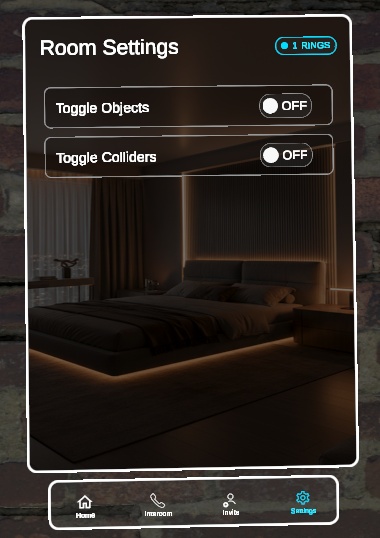
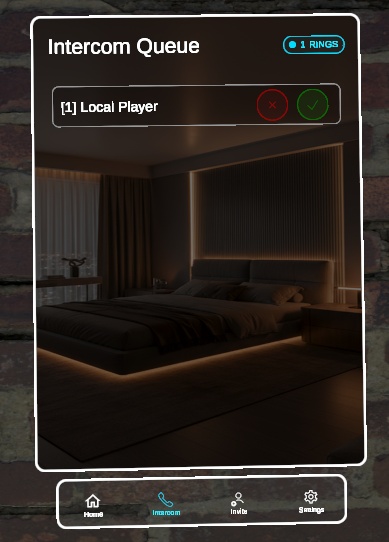
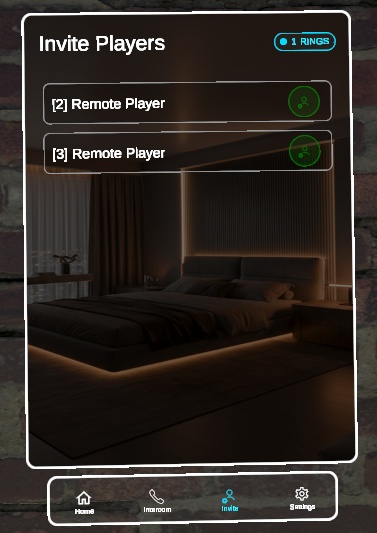
🇯🇵 機能 プライバシー管理 入室者は部屋の施錠・解錠、外部からプレイヤーリストを隠す「匿名モード」の切り替え、インターコムのリクエストをブロックする「取り込み中モード」の切り替えが可能です。 カスタマイズ 入室者は部屋に表示するカスタム文章を設定したり、部屋の背景画像の上に表示されるゲーム内写真を撮影したりできます。 UIの設定 インターフェースはワールド制作者によって完全に調整可能です。メインカラーテーマ、背景画像、背景色などを、あなたのワールドに合わせて簡単に変更できます。 インターコムシステム 外部のプレイヤーは部屋を呼び出すことができます。入室者は入室を許可・拒否する前に、ライブインターコム映像で呼び出し相手を確認できます。 通知システム インターコムの呼び出しや入室拒否リクエストに対する内蔵アラートを搭載しています。これは必須の依存関係であるカスタムNotification Systemに依存しています。 プレイヤー招待 専用ページから、現在の入室者が外部のプレイヤーを選んで部屋に招待できます。 モジュール設定 入室者が特定のコライダーやオブジェクトを切り替えられる、内蔵の設定ページを搭載しています。このシステムは、ワールド制作者が独自のカスタム設定やトグルを簡単に追加できるように設計されています。 ----------------------------------------------- 🇬🇧 Features Privacy Controls Occupants can lock or unlock the room, toggle Anonymous Mode to hide the player list from the outside, and toggle Do Not Disturb to block intercom requests. Customization Occupants can set a custom text sentence for the room and take an in-game picture that displays on top of the room's background image. UI Configurability The interface is fully adjustable by the world creator. You can easily change the main color theme, background image, background color, and more to match your world. Intercom System Outside players can ring the room. Occupants can open a live intercom feed to see the caller before accepting or denying entry. Notification System Includes built-in alerts for intercom rings and denied entry requests. This relies on our custom Notification System, which is as a required dependency. Player Invitations A dedicated page allows current occupants to select and invite outside players into the room. Modular Settings Includes a built-in settings page for occupants to toggle specific colliders and objects. The system is designed to let world creators easily add their own custom settings and toggles.
必須の依存関係 (Required Dependency)
🇯🇵 必須の依存関係 このアセットが動作するには、Unityプロジェクトに Notification System がインストールされている必要がありますのでご注意ください。Room Systemは、インターコムの呼び出しや入室拒否通知などの内蔵アラートの処理・表示を、この依存関係に完全に依存しています。 ----------------------------------------------- 🇬🇧 Required Dependency Please note that this asset requires the Notification System to be installed in your Unity project to function. The Room System relies entirely on this dependency to handle and display built-in alerts, such as intercom rings and denied entry requests.
免責事項 (Disclaimer)
🇯🇵 免責事項 スクリーンショットに表示されている背景画像はデモンストレーション目的のみです。機能の項目で述べた通り、背景画像と色は完全にカスタマイズ可能で、Unity上であなたのワールドに合わせて変更できます。 このシステムにはデフォルトのドアモデルが含まれており、ご自身のカスタムドアに簡単に差し替えることができます(ドアモデル制作:Toni García Vilche氏 https://sketchfab.com/zul_gv)。 ----------------------------------------------- 🇬🇧 Disclaimer The background image shown in the screenshots is for demonstration purposes only. As stated in the features, the background image and colors are fully customizable and can be changed in Unity to match your world. The system includes a default door model that can be easily replaced with your own custom door (Door model by Toni García Vilche: https://sketchfab.com/zul_gv).
重要な購入に関する注意事項 (IMPORTANT PURCHASE WARNING)
🇯🇵 重要な購入に関する注意事項 購入時にダウンロードされる .unitypackage には、アセットファイルが直接含まれていませんのでご注意ください。代わりに、CrZVRC License Manager が含まれています。 Boothではライセンスキーが自動生成されないため、アセットをダウンロードするには以下の手順を行っていただく必要があります。 公式Discordサーバーに参加し、サポートチケットを開いてください。 購入証明(Boothの購入履歴など)を提示してください。 確認が完了次第、あなた専用のライセンスキーを発行します。 キーを受け取った後は、Unity内のLicense Managerを使用してアセットをダウンロード・インストールしてください。License Managerの使用方法についての詳しい手順は、こちらをご覧ください: https://docs.crzvrc.com/docs/documentation/licence ----------------------------------------------- 🇬🇧 IMPORTANT PURCHASE WARNING Please note that the .unitypackage you download upon purchase does not contain the asset files directly. Instead, it contains the CrZVRC License Manager. Because Booth does not automatically generate license keys, you must complete the following steps to download your asset: Join our official Discord server and open a support ticket. Provide your proof of purchase (such as your Booth receipt). Once verified, you will be provided with your personal license key. After receiving your key, you must use the License Manager inside Unity to download and install your asset. Detailed instructions on how to use the License Manager can be found here: https://docs.crzvrc.com/docs/documentation/licence
ドキュメント&セットアップ (Documentation & Setup)
🇯🇵 ドキュメント&セットアップ このアセットのセットアップおよび設定方法についての詳しい手順は、公式ドキュメントサイトに掲載されています。 https://docs.crzvrc.com ----------------------------------------------- 🇬🇧 Documentation & Setup Detailed instructions for setting up and configuring this asset can be found on the official documentation website. https://docs.crzvrc.com
利用規約&プライバシーポリシー (Terms of Service & Privacy Policy)
🇯🇵 利用規約&プライバシーポリシー このアセットを購入・ダウンロードすることにより、当方の利用規約およびプライバシーポリシーに同意したものとみなされます。 両方の全文は以下のウェブサイトでご確認いただけます:https://docs.crzvrc.com/docs/documentation/licence ----------------------------------------------- 🇬🇧 Terms of Service & Privacy Policy By purchasing and downloading this asset, you agree to our Terms of Service and Privacy Policy. You can read both full documents on the website: https://docs.crzvrc.com/docs/documentation/licence
サポート&お問い合わせ (Support & Communication)
🇯🇵 サポート&お問い合わせ 技術的なサポート、不具合報告、その他一般的なお問い合わせは、すべて公式Discordサーバーにて対応しております。 Discordサーバーはこちらから参加できます:https://discord.com/invite/3W7h3Bp3mH ----------------------------------------------- 🇬🇧 Support & Communication All technical support, bug reports, and general communications are handled exclusively through our official Discord server. Join the Discord server here: https://discord.com/invite/3W7h3Bp3mH